
Missed-deadline calculator for Superbuy services, in UK time
Pick the service, enter when its clock started on your UK clock, and see the deadline in BST or GMT and in Beijing, plus a conditional credit illustration if the service ran over.
The missed-deadline calculator
Everything runs in your browser and nothing is sent anywhere. Retained service references were read on 10 October 2026; the return/exchange tiers and weekly credit schedule were rechecked against current Chinese help 3457 and 1442 on 18 October. UK clock changes follow gov.uk.
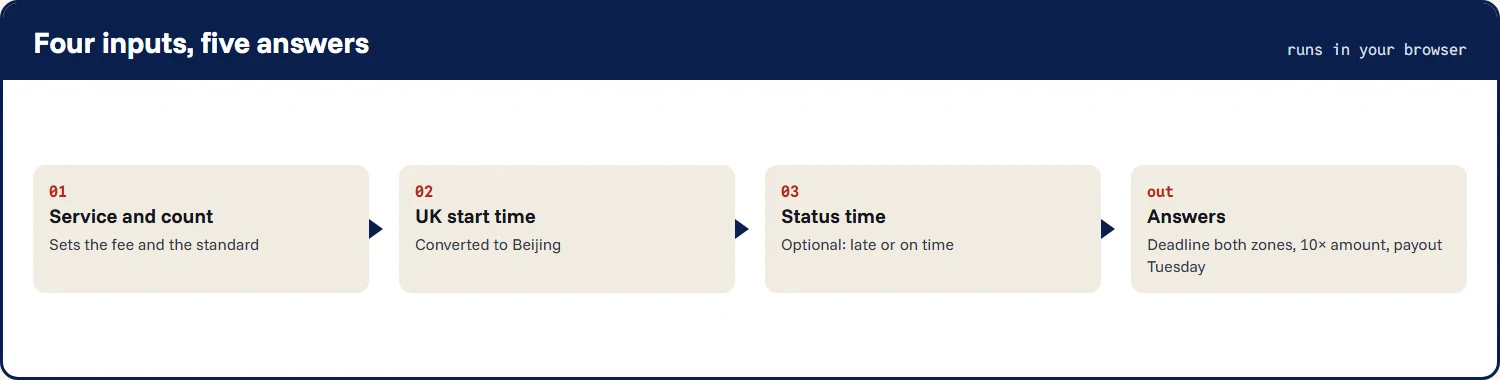
Filling in the calculator, field by field
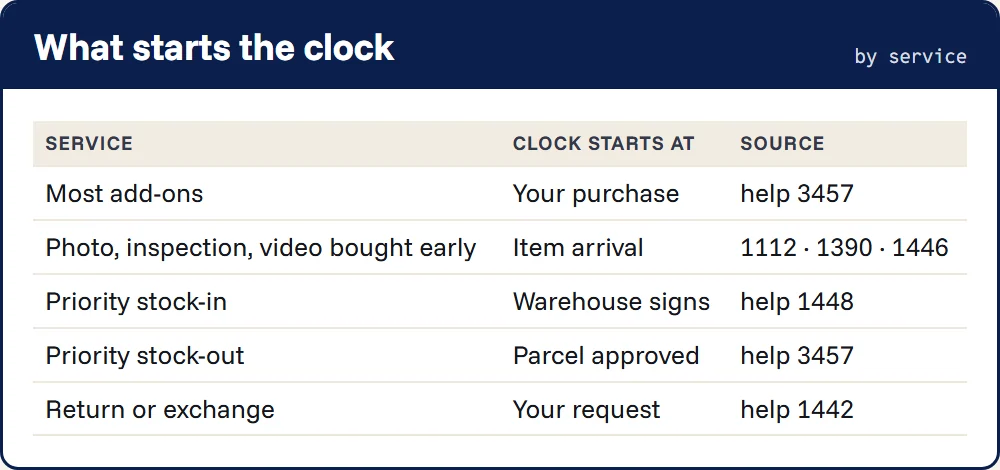
This is how to use the calculator. Pick the service first, because it decides what the start time means. For most services that is the moment you paid for it. For a detailed photo, detailed inspection or video bought at checkout, tick the box and enter the time the item arrived, which appears in your order history as it is stored.
Priority stock-in starts when the warehouse signs for the parcel. Priority stock-out starts when the parcel is approved. A return or exchange starts when you submit the request. Enter all of these as you saw them on your screen in the UK.
- Choose the service and the count: items, DIs, photos, months, or which return of the month this is.
- Leave the warehouse on Guangdong unless your order history says Hong Kong.
- Enter the UK date and time the clock started.
- If the status has already changed, enter when. The calculator then says whether the standard was met.
- Tick any exclusion that applied, then press the button. The result lists the deadline in both time zones, an entered actual fee or a published-fee illustration, and the conditional ten-times amount. It shows the scheduled Tuesday only for a potentially eligible scenario; Superbuy must verify the claim.
Worked example: a try-on across the clock change
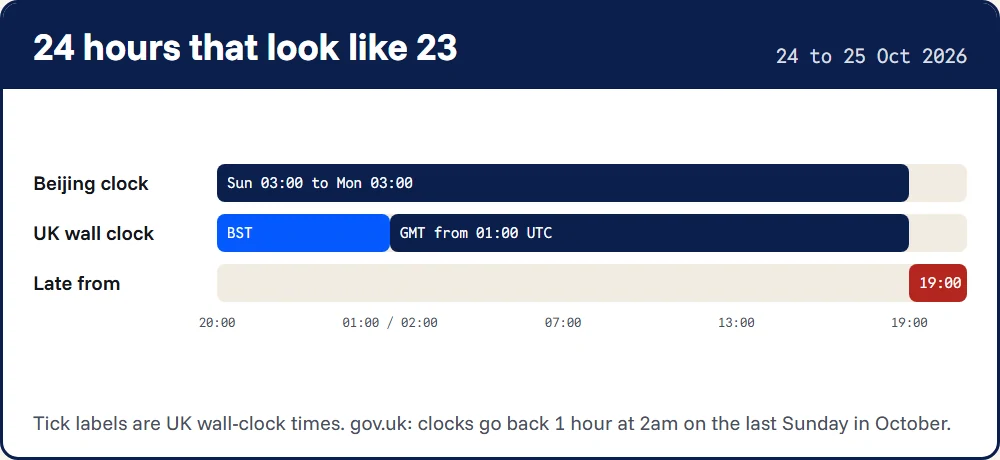
You order model try-on photos at 20:00 on Saturday 24 October 2026, after the item has arrived. In Beijing it is 03:00 on Sunday. Twenty-four hours later it is 03:00 on Monday in Beijing.
In the UK the clocks went back at 02:00 BST on Sunday morning, so 03:00 Monday in Beijing is 19:00 GMT on Sunday, not 20:00. If the photos appear at 19:30 GMT they are late, even though a British wall clock shows only 23 and a half hours since you paid.
Worked example: a Monday miss and the following-week Tuesday
You buy a video capture for an item already in the warehouse at 03:00 GMT on Sunday 1 November, which is 11:00 in Beijing. It is due at 11:00 Beijing on Monday 2 November, 03:00 GMT. The video appears at 14:00 Beijing: three hours beyond the stated standard. If the actual video-service payment was CN¥20 and all eligibility conditions are met, the credit illustration is CN¥200.
Current Chinese help 3457 and 1442 use Tuesday of the following week: Tuesday 10 November for this example, postponed for holidays. Tuesday 3 November is not the scheduled date under that weekly rule. The calculator shows the following-week date without approving the claim or checking holidays.
The cases the calculator is tested against
Before publishing, the calculator was run against these cases, each worked out by hand from the Superbuy articles and the gov.uk rule. If a result on your screen disagrees with this table for the same inputs, the page has a fault: please write in.
The cases were chosen to hit the edges rather than the middle: both clock changes, the repeated and the missing hour, the smallest and the largest fee rules, the tenth-use fee boundary and a Monday deadline that places the scheduled credit in the following week. A plain 24-hour service on an ordinary Wednesday is the easy case and needs no test of its own.
| Input | Expected result | Why |
|---|---|---|
| 11:00 BST, 24 Oct 2026 | 18:00 Beijing | 7-hour gap in BST |
| 10:00 GMT, 26 Oct 2026 | 18:00 Beijing | 8-hour gap in GMT |
| 01:30 UK, 25 Oct 2026 | Flagged: happens twice | Clocks go back at 02:00 BST |
| 01:30 UK, 28 Mar 2027 | Flagged: does not exist | Clocks go forward at 01:00 GMT |
| 5 detailed photos | Published fee CN¥7; conditional credit CN¥70 | Half price from the third photo |
| Stock-out, 14 DIs | Published fee CN¥12; conditional credit CN¥120 | 10 for ten DIs, 0.5 each after |
| First return of the month | Credit illustration CN¥0 | Ten times zero |
| 10th return of the month | Fee CN¥20; conditional 10× illustration CN¥200 | Current rule includes use 10 in the final tier |
| Stock-in signed 17:00 Beijing | 20:00, or 11:00 next day | Plain or working hours |
Blind spots in the calculator
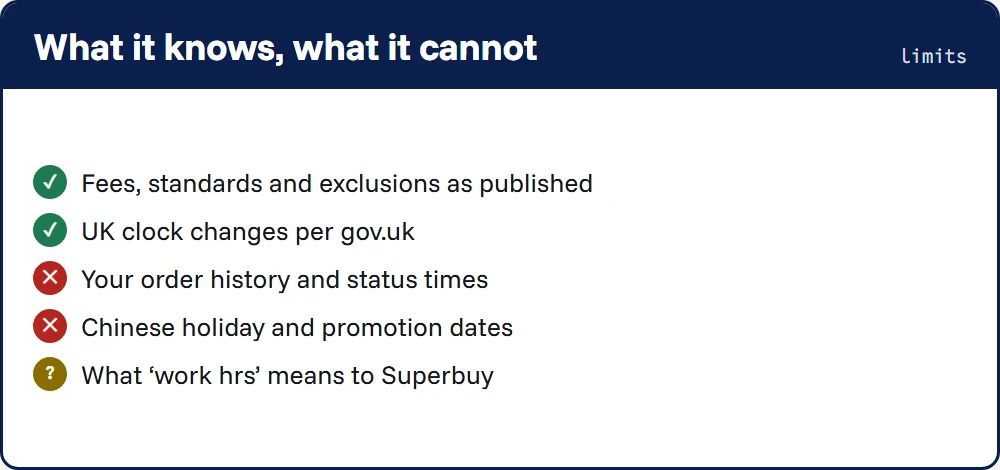
It does not know whether a Chinese public holiday or an announced promotion caused the delay; you must identify any applicable exclusion yourself. It cannot see your order history, so it cannot tell whether a status like “pending confirmation” appeared before the deadline. It reads “work hrs” as 09:00 to 18:00 Beijing every day, which is an assumption, labelled as one.
And it reports the standard, not what Superbuy will decide. An accepted eligible credit goes to non-withdrawable Superbuy balance. Lateness alone does not establish eligibility: the warehouse, paid service, response status and cause of delay still matter. If you think it should have been and nothing arrives, write to [email protected] with the order number.
Got a deadline? See which exclusions could still apply before you write in.